September 12, 2026 · TrueVortex Team
Facebook Messenger Chatbot for Retail Pages
How a Facebook chatbot turns Page messages, comments and Click-to-Messenger ads into answered sales conversations.
- Facebook chatbot
- Messenger
- retail ads
- customer intelligence
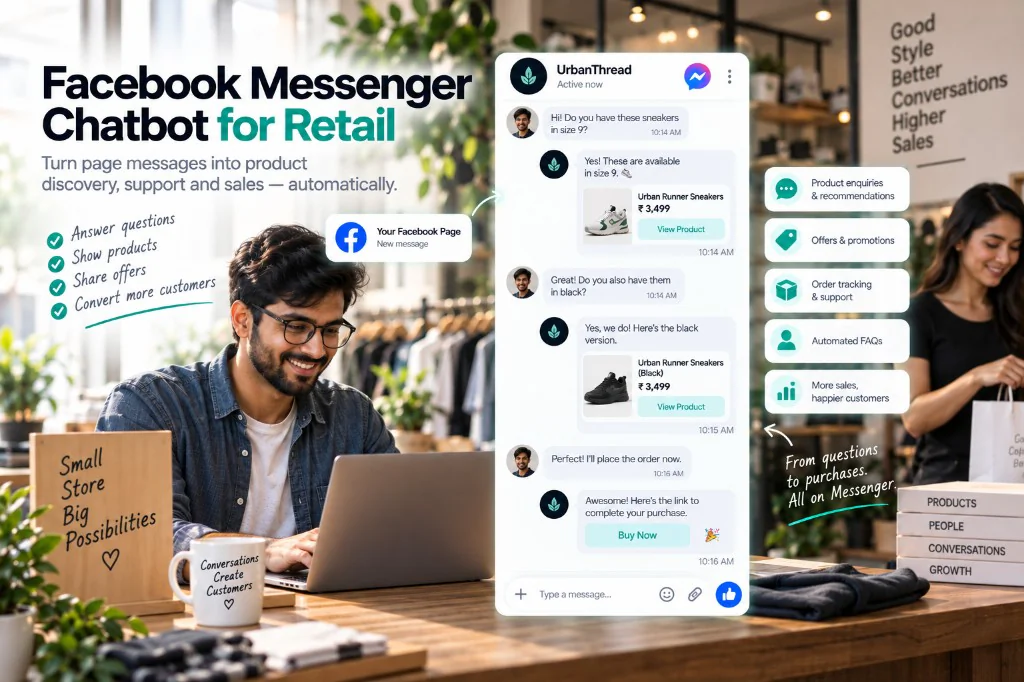
A Facebook chatbot — almost always a Messenger chatbot — replies when someone messages your Page. For retail, those threads come from three places: the organic Page inbox, comments on posts and ads, and Click-to-Messenger ads.
If the first reply is slow, paid clicks and warm comments go cold in the same queue.
That assistant is the live layer of Customer Intelligence inside TrueVortex — not a separate Messenger bot, and not a website chat widget. A website chat widget is not available yet.
Why Messenger is still a sales channel
Instagram gets the discovery credit. Messenger still gets the ad click. A shopper taps an offer, lands in a thread, and expects the product from the creative — not a “thanks, we’ll get back to you.”
A Facebook Messenger chatbot should answer with that product, confirm stock and shipping, and send a path to buy in the same chat.
What the assistant actually does
Trained on your catalog, offers, and policies, it turns Page messages into product discovery, support, and sales:
- Answers questions — size, stock, price, shipping, “do you have this in black?”
- Shows products in the thread — so the shopper does not have to hunt the site
- Shares the advertised offer — if the creative promised a bundle or free shipping, the first reply should confirm it
- Sends a path to buy — a product or checkout link in Messenger, not a dead “link in bio”
- Handles order care — tracking, returns, and FAQs so the Page inbox is not a second help desk
- Hands off to a human — complaints, wholesale, and custom orders go to your team with the Messenger history attached
It does not replace your POS, ads manager, or website. It continues the conversation the shopper already opened.
A conversation that actually converts
Ad tap: They see sneakers on a Click-to-Messenger ad and ask if you have size 9.
Inbox: The assistant confirms the pair is in stock, shows the product, and answers when they want it in black.
Checkout: They are ready. The assistant sends a buy link in the same Messenger thread.
Handoff: A custom order or a complaint goes to a teammate — with the full thread attached.
One shopper. One Page. A sale that did not wait for business hours.
What to automate first
- Ad-to-chat — match the SKU in the ad, confirm availability
- Comment questions — price and stock, moved into a private reply
- Order status — so the Page inbox is not a second help desk
- Handoff — complaints and custom orders to a person
Do not start with a 12-button menu. Shoppers type naturally. Train the assistant on the catalog the same way you would for Instagram and WhatsApp.
Facebook chatbot vs. saved replies
| Approach | Strength | Weakness on Messenger |
|---|---|---|
| Saved replies | Fast for one admin | Dies on ads, nights, and launches |
| Persistent-menu bot | Predictable buttons | Fails the moment they type a real SKU question |
| TrueVortex Messenger chatbot | Trained on advertised catalog | Hands off only when a person is needed |
TrueVortex keeps Facebook in the same chatbot inbox as WhatsApp, Instagram, and Telegram.
Getting started
TrueVortex connects the Page you already have, trains an assistant on the SKUs you advertise, and lets Click-to-Messenger land on an answer — no flowchart required.
Try now, explore chatbots, or read multi-channel AI chatbots.